Miya Bholat
May 12, 2026
5 Signs Your Fleet Systems Are Holding You Back

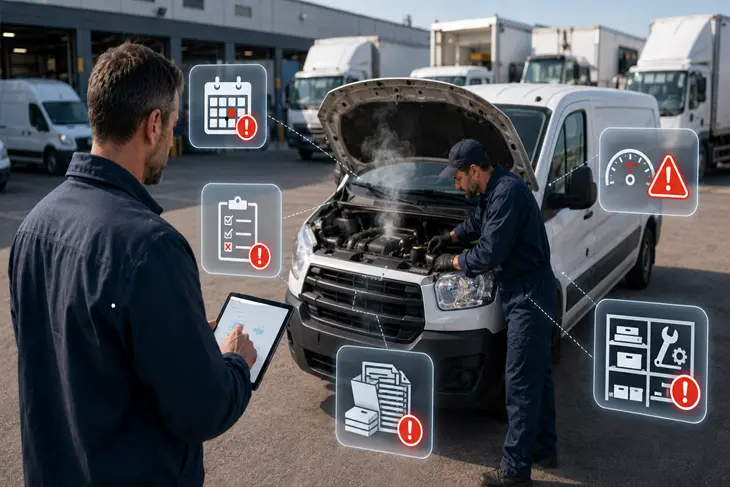
A fleet manager starts the week with three vehicles overdue for service, one truck down unexpectedly, and a stack of inspection forms waiting to be entered. Nobody on the team is lazy. The drivers are doing their routes, the maintenance team is trying to keep up, and the manager is doing everything possible to stay organized.
The problem is often not the people. It is the system they are forced to use. When fleet operations rely on disconnected tools, spreadsheets, binders, and manual follow ups, even a good team starts reacting instead of planning. A modern fleet management software setup should help managers see maintenance, inspections, costs, documents, and reporting in one place before small issues become larger problems.
This article breaks down five clear signs your fleet systems are holding you back: reactive maintenance, scattered records, manual reporting, poor cost visibility, and stressful compliance workflows. If several of these sound familiar, your operation may not need harder work. It may need better tools.
Key Takeaways
-
Reactive maintenance is a warning sign.
If your team only fixes vehicles after something breaks, your systems are not helping you prevent downtime. A better setup helps you schedule service before small issues turn into expensive repairs. -
Scattered records create risk.
Spreadsheets, binders, email threads, and memory based tracking make it harder to prove service history, support warranty claims, or prepare for audits. -
Manual reporting quietly drains time.
When managers spend hours chasing odometer readings, work orders, inspection forms, and repair costs, the fleet loses time that could be spent improving operations. -
Limited cost visibility leads to budget surprises.
If you only see repair trends, fuel spend, and total ownership costs after the quarter closes, it becomes harder to control spending before it gets out of hand. -
Compliance should not feel like a scramble.
DOT records, DVIRs, inspections, insurance documents, and service logs should be easy to find. If every audit feels like a fire drill, the system is holding the team back.
Sign 1: You're Still Reacting to Breakdowns Instead of Preventing Them
The Real Cost of Reactive Maintenance
Reactive maintenance means the vehicle gets attention after a problem has already disrupted the operation. Preventive maintenance means the team schedules service based on time, mileage, engine hours, inspection findings, or known wear patterns before the vehicle fails.
The difference can be expensive. Imagine a scheduled repair costs $450 when a vehicle is already in the shop for service. If that same issue becomes a roadside breakdown, the total cost may include towing, emergency labor, lost driver time, missed deliveries, rental vehicles, and customer delays. Even if the repair itself stays similar, the operational cost can easily multiply.
A fleet stuck in reactive mode usually looks like this:
- Vehicles come into the shop only after drivers report problems
- Maintenance reminders depend on memory or spreadsheets
- Repairs happen during peak operating hours
- Managers do not see patterns until several failures have already happened
- Drivers lose confidence because vehicle issues keep repeating
When this becomes normal, the fleet starts treating breakdowns as part of the job instead of a preventable operating problem. For more context on this pattern, learn how managers can identify fleet performance issues early before they turn into larger disruptions.
What Proactive Fleet Systems Look Like
Proactive systems give managers a clear way to schedule, assign, and track maintenance before vehicles fail. Instead of relying on someone to remember when a unit needs service, the system can trigger reminders based on mileage, time, or recurring intervals.
A strong setup usually includes:
- Maintenance schedules by vehicle or asset type
- Reminders based on mileage, time, or service intervals
- Clear work order history for completed repairs
- Inspection results that can flag problems early
- Reports that show which vehicles create repeat issues
This is where tools like fleet preventive maintenance schedules become useful. They help fleet teams move from "fix it when it breaks" to "service it before it slows us down."
Sign 2: Your Maintenance Records Live in Spreadsheets, Binders, or Someone's Head
Fragmented recordkeeping may seem manageable when the fleet is small. A spreadsheet here, a binder there, a few invoices in email, and one person who "knows the history" of every vehicle can work for a while. But as the fleet grows, that system becomes fragile.
The risk is not just inefficiency. Missing records can create problems during audits, warranty claims, insurance reviews, and internal cost analysis. If a manager cannot quickly pull a vehicle's full service history, the business may struggle to prove that required maintenance was completed.
Picture a manager trying to answer a simple question: when was the last brake service completed on Vehicle 18? If the answer requires checking a spreadsheet, calling a technician, searching invoices, and opening a filing cabinet, the record system is already slowing the operation down.
Scattered maintenance records can lead to:
- Duplicate repairs because past work is hard to confirm
- Missed intervals because service dates are buried in old files
- Warranty issues because proof of maintenance is incomplete
- Higher liability exposure after an incident
- Slow decisions when managers need quick vehicle history
A centralized vehicle service history gives teams one place to track completed maintenance, repairs, inspections, and supporting records. This also supports the broader point in debate of spreadsheets vs fleet management software, which explains why manual tools often break down as operations become more complex.
Sign 3: Your Team Wastes Hours on Manual Reporting and Data Entry
Where Time Gets Lost in Manual Fleet Management
Manual reporting does not always feel like a major problem in the moment. It shows up as small tasks that repeat every week: entering odometer readings, chasing inspection forms, checking repair invoices, updating spreadsheets, and building reports for leadership.
But the time adds up quickly. If one manager spends 5 hours per week on manual reporting, that equals 260 hours per year. If a three person operations team each spends the same amount of time, the business loses 780 hours per year to reporting work that could often be simplified.
Common manual time drains include:
- Copying odometer readings from messages into spreadsheets
- Following up with drivers for missing inspection forms
- Rebuilding weekly maintenance reports from scratch
- Searching email for repair invoices and work orders
- Updating leadership after costs have already changed
This is the type of discusses you would have on how to reduce fleet manager administrative workload. The real issue is not only the time spent typing. It is the delay between when something happens and when the manager can act on it.
How Automation Changes the Workflow
Automation changes the workflow by making information easier to capture and easier to use. Instead of waiting for paper forms or manual updates, a fleet manager can review digital inspection results, open work orders, service reminders, cost reports, and asset information from one system.
A modern fleet operation may use digital work orders to assign repair tasks, real time dashboards to monitor activity, and automated reports to keep leadership informed. The goal is not to remove people from the process. The goal is to remove repetitive work that slows people down.
Features like a fleet reports dashboard help managers turn daily fleet activity into clearer reporting. When reporting becomes easier, teams can spend more time solving problems and less time preparing spreadsheets.
Sign 4: You Have No Visibility Into Fleet Costs Until It's Too Late
Cost visibility is one of the biggest reasons fleet systems matter. A manager may know a repair bill was high, but that does not always show the full picture. The real question is whether that vehicle is becoming more expensive to operate over time.
Without clear cost tracking, fleets often fly blind on total cost of ownership, repair trends, fuel spend, parts usage, downtime, and replacement timing. A vehicle may look affordable because it is paid off, but the repair pattern may show that it is costing more than it should.
Imagine a fleet manager reaching the end of the quarter and realizing maintenance costs are 30 percent higher than expected. The money is already spent. At that point, the team can explain the overrun, but it is harder to prevent it.
Better cost visibility helps managers answer questions like:
- Which vehicles cost the most to maintain
- Which repair categories are increasing
- Which units have repeat downtime
- Which vehicles should be replaced instead of repaired
- Which locations or teams need closer cost review
This is why related resources on how fleet management software reduces costs can be useful for managers evaluating the business case for better systems. Cost control improves when managers can see trends early enough to act.
Fuel is also part of the picture. A fleet that tracks maintenance but ignores fuel may still miss major operating cost patterns. Using fleet fuel management software can help connect fuel activity with broader fleet cost decisions.
Sign 5: Compliance and Inspections Feel Like a Fire Drill Every Time
Compliance stress is another clear sign that the system is not supporting the team. If DOT records, DVIRs, inspection forms, insurance documents, registrations, licenses, and service logs are scattered across different places, every review becomes harder than it needs to be.
A compliance workflow should not depend on one person remembering where every document is stored. It should give the team a structured way to complete inspections, store documentation, review defects, and prove that corrective action happened.
This matters beyond avoiding fines. Inspection and compliance workflows affect driver safety, liability, uptime, and operational continuity. When records are incomplete, small paperwork gaps can become larger business risks.
A stronger compliance process often includes:
- Digital inspection forms for drivers
- Stored DVIR records by vehicle
- Document tracking for registrations and insurance
- Maintenance follow up for failed inspection items
- Easy access to records during audits or internal reviews
A digital vehicle inspection app helps standardize inspection workflows so issues can be captured and addressed faster. For supporting documents, a vehicle document management system can help keep important files organized instead of scattered across folders, emails, and desks.
How to Tell If It's Your System, Not Your Team
When fleet operations feel chaotic, it is easy to assume people need to work harder, communicate more, or pay closer attention. Sometimes that is true. But in many fleets, the people are already doing their best inside a system that creates friction.
The best way to diagnose the issue is to look at how long simple tasks take. A healthy system should make important information easy to find, easy to update, and easy to act on. If the team has to search multiple places to answer basic operational questions, the system is creating drag.
Ask these questions during a quick self audit:
- How long does it take to pull the full service history for one vehicle
- Can you see overdue maintenance without opening a spreadsheet
- Do inspection issues automatically lead to follow up action
- Can you explain last month's repair costs without rebuilding a report
- Do you find out about breakdown risks before or after they disrupt work
If the answer to most of these questions is "not easily," your team may not be the problem. Your tools may be forcing good people to operate with poor visibility. Understand and learn more about why fleet management systems break in operations.
What to Look for When Evaluating Fleet Management Software
If these signs sound familiar, the next step is not to buy the first tool you find. Fleet management software should match how your operation actually works. The right system should make daily work simpler, not add another layer of complexity.
When comparing options, look for practical capabilities that solve the problems your team already feels:
- Ease of use: Drivers, managers, and technicians should be able to use the system without heavy training
- Mobile access: Teams should be able to update inspections, service activity, and records from the field
- Maintenance scheduling: The software should support recurring service reminders by time, mileage, or usage
- Reporting: Managers should be able to see trends without rebuilding reports manually
- Integrations: The system should connect with important fleet workflows instead of creating more silos
- Support: A good vendor should help your team adopt the system successfully
Fleet management software can be a strong fit for fleets that need maintenance tracking, inspection workflows, document management, cost reporting, and related fleet operations tools in one place. But regardless of which platform you choose, the goal should stay the same: reduce manual work, improve visibility, and help the team make better decisions faster.
If you are comparing options, AUTOsist's fleet management software buyers guide can help you evaluate features, cost, usability, and implementation needs in a more structured way.
Finally: Is Your Fleet System Working For You or Against You?
Outdated fleet systems rarely fail all at once. They usually fail slowly. First, a spreadsheet becomes too large. Then a maintenance reminder gets missed. Then a vehicle breaks down unexpectedly. Then a manager spends hours rebuilding a report. Then compliance records become difficult to find when someone asks for them.
The five signs are clear: reactive maintenance, scattered records, manual reporting, poor cost visibility, and stressful compliance workflows. Any one of these can slow a fleet down. Together, they create a system that costs more than it seems.
Switching systems may feel like a big decision, but staying with a broken process has a cost too. It costs time, money, visibility, and confidence. For fleet managers who are ready to move from scattered tracking to a more organized operation, AUTOsist gives teams a practical way to manage maintenance, inspections, records, documents, costs, and reporting in one connected platform.
Frequently Asked Questions
-
How do I know if my fleet management software is outdated?
Your software may be outdated if your team still relies on spreadsheets, paper forms, manual reminders, or separate tools to manage daily fleet work. A good system should help you track maintenance, inspections, costs, documents, and reports without constant manual follow up. -
What's the average cost of a fleet breakdown?
The cost depends on the vehicle type, repair, location, downtime, towing, replacement vehicle needs, and lost productivity. A scheduled repair may cost hundreds of dollars, while an unexpected roadside breakdown can cost much more once downtime and operational disruption are included. -
Can small fleets benefit from fleet management software?
Yes. Small fleets often feel the impact of one breakdown or missed service interval even more because they have fewer spare vehicles. Fleet software can help small teams stay organized without adding extra administrative work. -
How long does it take to switch fleet management systems?
The timeline depends on fleet size, record quality, user training, and the features being implemented. Many fleets can start with maintenance schedules, vehicle records, inspections, and documents first, then expand into reporting and cost tracking over time. -
What is the biggest sign that a fleet system is holding the team back?
The biggest sign is when managers cannot quickly answer basic questions about maintenance, costs, inspections, or vehicle history. If simple answers require searching multiple files, asking several people, or rebuilding reports manually, the system is slowing the operation down.