RESOURCES
Fleet Vehicle Tracking Spreadsheet Template
Tracking your fleet in scattered spreadsheets, emails, and sticky notes means something always falls through. Use one organized workbook to manage every vehicle, assignment, fuel entry, and compliance date in a single place.
Tracking your fleet in scattered spreadsheets, emails, and sticky notes means something always falls through. Use one organized workbook to manage every vehicle, assignment, fuel entry, and compliance date in a single place.
Why do fleet managers need a vehicle tracking spreadsheet?
Why do fleet managers need a vehicle tracking spreadsheet?
Without a central vehicle record, critical information lives in different places registration dates in one file, insurance in another, fuel receipts in a folder nobody checks. When something expires or a vehicle goes missing from the rotation, there is no single place to look. A vehicle tracking spreadsheet puts every asset, assignment, and compliance date in one workbook so nothing gets missed.
What is the best way to track a company vehicle fleet?
What is the best way to track a company vehicle fleet?
The most reliable approach is to keep a master vehicle registry updated with each asset's details, track insurance and registration expiry dates in one place, and log fuel entries consistently. This template makes that straightforward. When your fleet grows and manual updates become a daily burden, fleet management software captures vehicle data automatically with no spreadsheet to maintain.
Get Your Free Fleet Vehicle Tracking Spreadsheet
What you can track with this template
What you can track with this template
Download the template and you can start tracking in minutes. Here is what each tab covers.
Manage every vehicle in one place
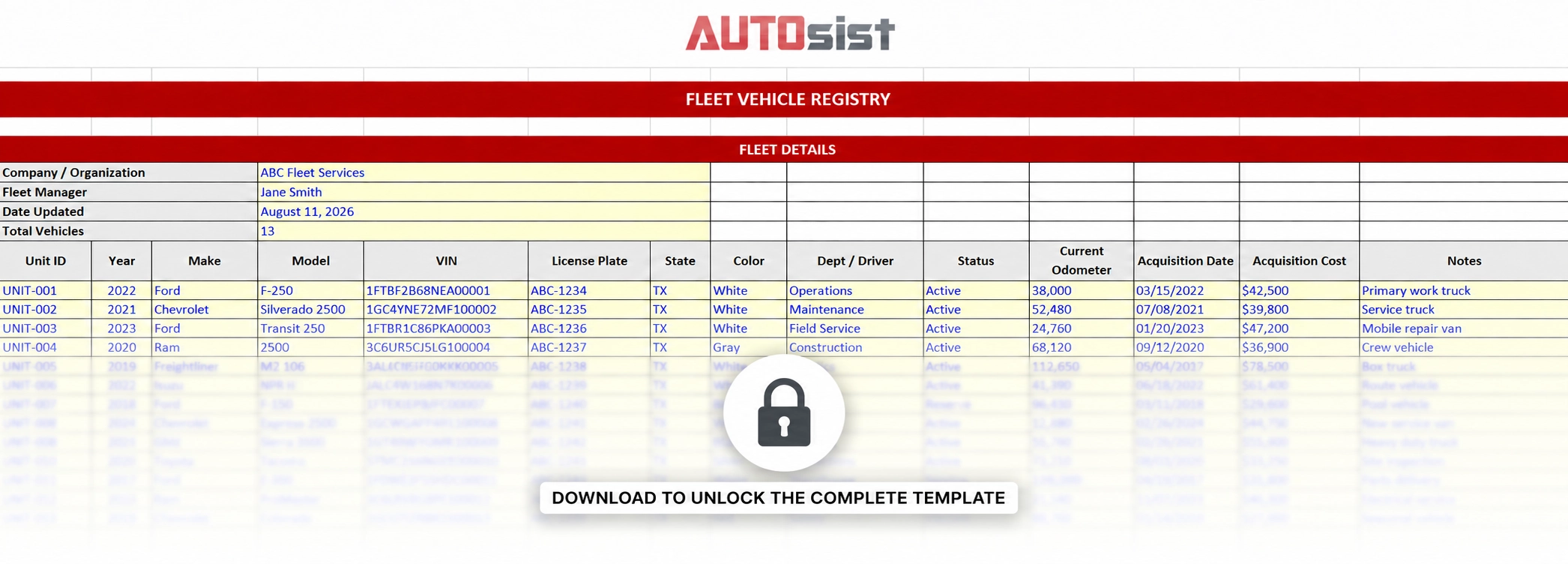
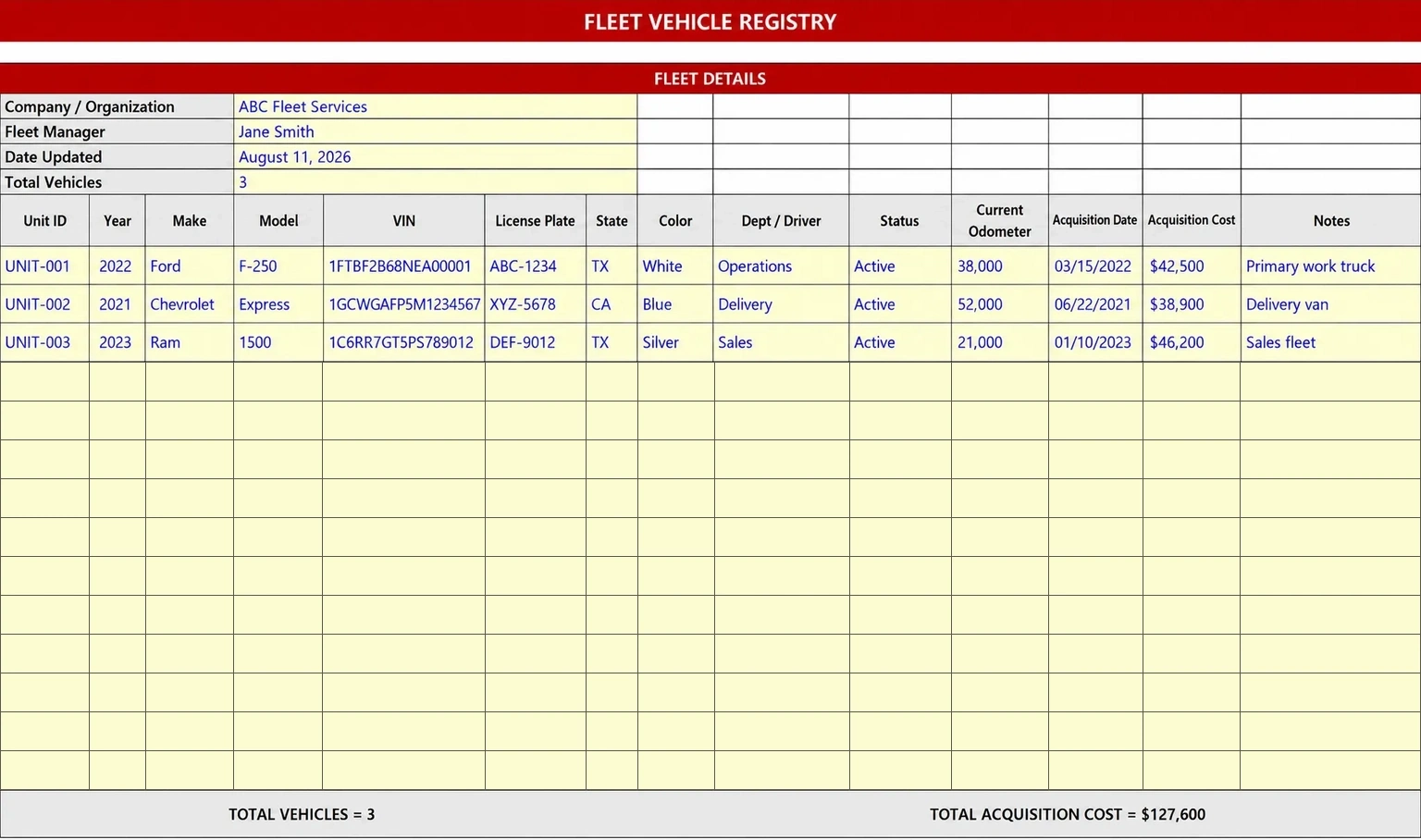
The Vehicle Registry tab is your master list. Add one row per vehicle with its unit ID, year, make, model, VIN, license plate, assigned department or driver, status, current odometer, and acquisition cost. Total vehicle count and total acquisition cost calculate automatically at the bottom.
Never miss an insurance or registration date
The Insurance and Registration tab tracks every compliance deadline in one place i.e. insurance provider, policy number, coverage type, annual premium, policy expiry, registration expiry, and next inspection date. Days until expiry calculate automatically from today so you can see which vehicles need attention before the month is out. Use this tab alongside our fleet compliance guide to make sure nothing falls through.
Track fuel costs and mileage across the fleet
The Fuel Log tab records every fill-up: date, unit ID, driver, odometer, gallons, price per gallon, and fuel type. Total fuel cost per entry calculates automatically. MPG calculates from consecutive odometer readings so you can spot which vehicles are burning more than they should. The summary section at the bottom shows total fuel cost, average price per gallon, and average fleet MPG. Pair this with our post on how to track fleet costs without guesswork for a complete cost tracking process.
Know who has each vehicle and for how long
The Assignment Log tab tracks which driver is assigned to which vehicle and when. Each row captures the unit ID, assigned driver, department, assignment start and end dates, and the purpose or route. Days assigned calculates automatically. For active assignments where no end date is entered yet, the count continues updating each day so you always see how long a vehicle has been out with a specific driver.
See your entire fleet at a glance
The Fleet Summary Dashboard pulls everything together automatically. Fleet size broken down by status, total acquisition cost, total annual insurance premiums, total fuel cost year to date, and an upcoming expirations alert box that counts insurance policies, registrations, and inspections due within the next 30 days. Nothing needs to be entered here. It all updates as you fill in the other tabs, so a quick monthly check tells you exactly where your fleet stands.
Manage your Fleet Tracking inside AUTOsist
Manage your Fleet Tracking inside AUTOsist
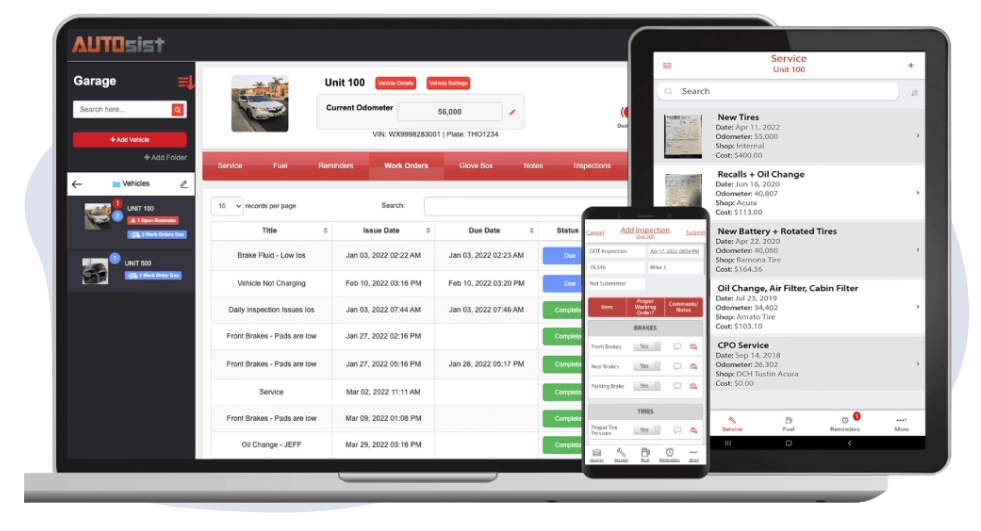
This spreadsheet gives you a starting point. AUTOsist's fleet maintenance software gives you the same visibility without the manual updates. Every service record, inspection, fuel entry, and work order logged in AUTOsist feeds directly into your vehicle data. Insurance and registration reminders go out automatically before a deadline hits. When your fleet grows past what a spreadsheet can handle, every vehicle record, compliance date, and cost history moves with you, accessible to your whole team through the mobile app from any device.
This spreadsheet gives you a starting point. AUTOsist's fleet maintenance software gives you the same visibility without the manual updates. Every service record, inspection, fuel entry, and work order logged in AUTOsist feeds directly into your vehicle data. Insurance and registration reminders go out automatically before a deadline hits. When your fleet grows past what a spreadsheet can handle, every vehicle record, compliance date, and cost history moves with you, accessible to your whole team through the mobile app from any device.
What AUTOsist customers are saying
We are already seeing the value of the investment and the return on investment. AUTOsist is a very valuable tool for us to have the insight that it provides is invaluable to our mechanics. The ability to have records without maintaining paper files, and for DOT compliance and federal motor carrier compliance.
Read case study →
I love AUTOsist’s tracking ability for our vehicles and equipment, the reminders for regularly scheduled maintenance or inspections, and how everything that is done with, or to a specific piece of equipment, is all together in one place and we can go back and review it at any time.
Read case study →
Everything we do is now logged electronically so being able to show this to customers is a large selling point for transparency. With AUTOsist, we now have a one-stop shop for all of our fleet data.
Read case study →
Other Free Fleet Templates
Popular downloads from our template library.
Fleet Budget Template
Plan annual fleet costs by category and quarter.
Maintenance Log Template
Log every service across your fleet.
Work Order Template
Track repairs, parts, and labor.
Vehicle Inspection Form
DOT-compliant daily driver checks.
Frequently Asked Questions
A fleet vehicle tracking spreadsheet should include a master vehicle registry with unit ID, make, model, year, VIN, license plate, and assigned driver or department. It should also track insurance and registration expiry dates, fuel entries with odometer readings, driver assignments, and vehicle status. This template covers all of these across five tabs.
The Insurance and Registration tab in this template calculates days until expiry automatically from today's date for both insurance policies and registrations. Enter the expiry date once and the template tells you how many days remain. Review this tab at the start of each month to catch upcoming renewals before they lapse.
The Vehicle Registry tab supports up to 50 vehicles and the Insurance and Registration tab matches that capacity. The Fuel Log supports 100 entries and the Assignment Log supports 75 records. You can extend any tab by adding rows and the formulas will follow the same pattern throughout.
The Fuel Log tab calculates total fuel cost automatically when you enter gallons and price per gallon. MPG calculates automatically from consecutive odometer readings. Enter the odometer at each fill-up and the tab does the rest. The summary section at the bottom shows average fleet MPG and total fuel cost across all entries.
Most fleets start feeling the limits of a spreadsheet around 15 to 20 vehicles. At that point, keeping fuel logs, insurance dates, assignments, and service records updated manually becomes a daily administrative task. Fleet management software that captures vehicle data automatically from service records, fuel integrations, and GPS becomes a more reliable foundation.
Yes. This template covers vehicle records, compliance dates, fuel, and assignments. Use it alongside the fleet maintenance log template for service history, the fleet budget template for annual cost planning, and the fleet maintenance work order template for repair tracking.